Configuration
Configuration


- Details
- Parent Category: Simple rezzer
- Created on Saturday, 10 April 2010 12:43
- Last Updated on Wednesday, 11 September 2013 14:40
- Published on Saturday, 10 April 2010 12:43
- Written by sandrine
- Hits: 697
How to configure the script rezzer ?
You configure the script rezzer with the notecard configrezzer. You creat this notecard after the setup with the basic informations :
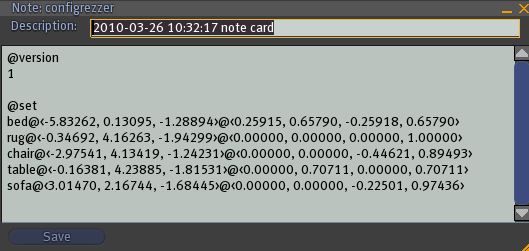
Sections syntax
version
The syntax is simple :
@version
number
For example for the first time :
@version
1
The next time the number increase :
@version
2
And so on
set
The syntax is simple :
@set
object name@position@rotation
For example :
bed@<-5.83262, 0.13095, -1.28894>@<0.25915, 0.65790, -0.25918, 0.65790>
Object name : bed
Position : <-5.83262, 0.13095, -1.28894>
Rotation : <0.25915, 0.65790, -0.25918, 0.65790>
Optional sections
api (optional)
The syntax is
@api
channel number
For example
@api
23560
Used for slave mode.
The api can get the object name to rez or the command name if there is a section @command.
New in version 1.31 : special commands rezall and delall
trigger (optional)
The syntax is :
@trigger
name
Need @api section to work. The rezzer menu is triggered if there is the name in the api channel.
command (optional)
The syntax is :
@command
command name|object name
For example :
@command
couch|bed
sit|chair
Need section @api to work.
menu (optional)
The syntax is :
@menu
name|object
For example :
@menu
bed|comfy bed V1.32
chair|easy chair V3.21
dump (optional) new in version 1.2 !
The syntax is :
@dump
yes or no (default value)
For example :
@dump
yes
Now you get new coordinates in Chat if you move or rotate a rezzed object so you can change the line in the @set section.
options(optional) new in version 1.3 !
The syntax is :
@options
rez on/off
rezall on/off
del on/off
delall on/off
move on/off
For example :
@options
rezall off
delall off
This section is for menu options. Default is "on" for all options.
If you put here "delall off" you'll get no more option "Dell All" in menu.
If you dont put this section all values are "on".