Overview


- Details
- Parent Category: Ultimate door system
- Created on Wednesday, 20 February 2013 12:42
- Last Updated on Wednesday, 11 September 2013 14:40
- Published on Wednesday, 20 February 2013 12:42
- Written by sandrine
- Hits: 258
There are many possibilities to configure the Ultimate door system, let's look what we can do !
Simple door

A simple door needs only 3 scripts : action, command and access. You get the menu with chat command /70door.
Double door

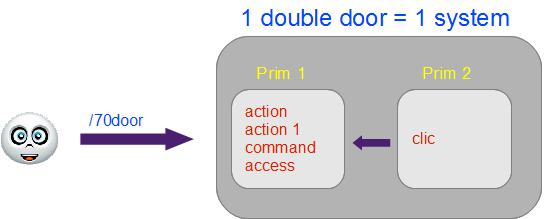
A double door needs only 4 scripts in one of the primitives of the door : 2 action, command and access. You get the menu with chat command /70door.
If you want to command you door with a click (to get click command you must set sensor range to 0) you must add script clic in the second primitive, so command will work with click on the two primitives :
Two doors (or more) in a same linkset
You have 3 ways to manage this situation. The first one is to set this configuration :
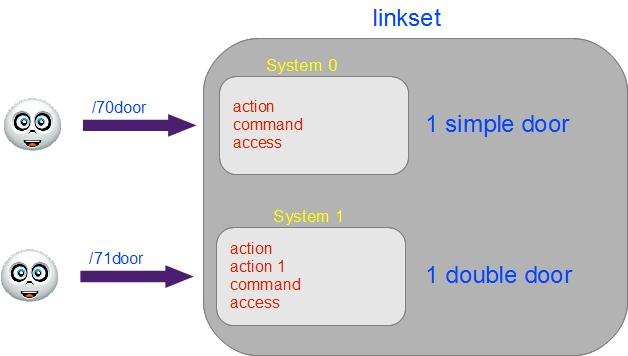
The doors are independants for command and access.
The second way is quite the same :
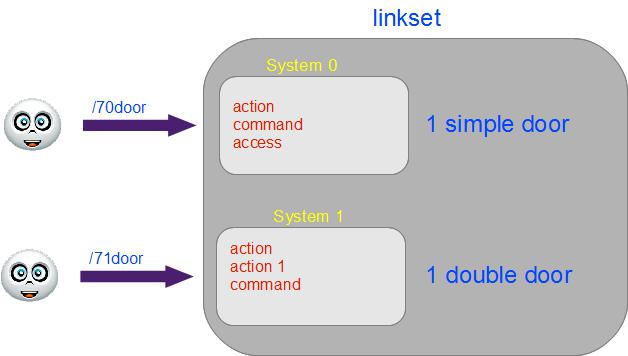
The différence is there is only 1 script access so doors are independants for settings but not for access.
In the third way you use a remote :
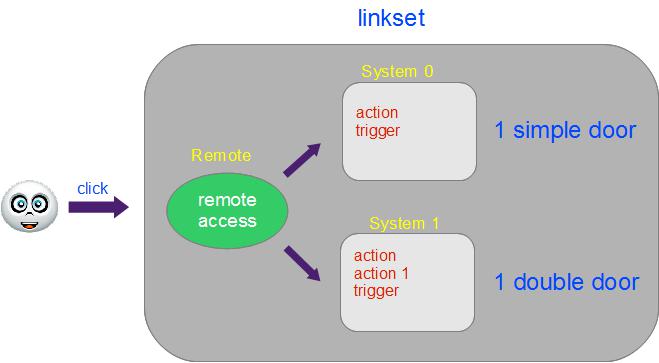
In this case you get the menu with a click on the remote. Settings and access are same for the two doors. You use script trigger instead of command. There is only a script access in the remote. The script remote manage the whole system.
Complex configuration
Now you want to set a configuration with a remote for all doors, but get an independant command for a door (or for example shutters because you dont want them to work with sensor but only on click) :
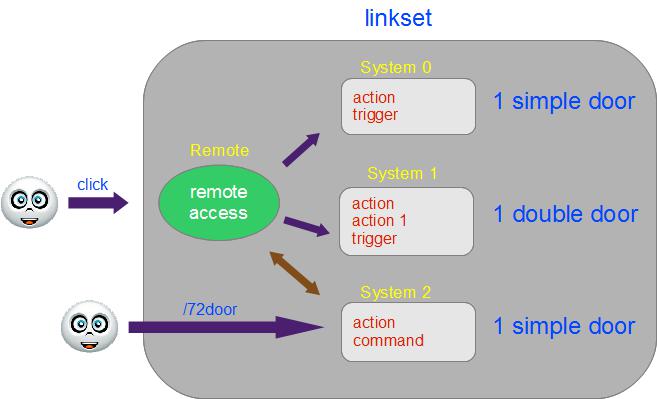
In this case only access is managed by the remote for the independant door, all settings (sensor, click) are managed by script command.